
Cijferlijsten ineveren
Van docenten wordt verwacht dat zij de door hun studenten behaalde resultaten aanleveren en ondertekenen. Volg de onderstaande instructies voor een vlotte verwerking door de Science Studentenadministratie:
De Science Studentenadministratie van de stuurt vier dagen voor het tentamen per e-mail een lijst met cijfers. Deze lijst bevat gegevens van studenten die zich via Usis voor de betreffende toets hebben aangemeld, conform het aanmeldprotocol.
Algemene instructies
- Vul alle behaalde resultaten in op de ontvangen cijferlijst, inclusief onvoldoendes voor het (her)examen of de extra herkansing.
- Rond de cijfers af op hele (0) of halve (0,5) punten. Een cijfer van 5,5 kan alleen als heel cijfer worden geregistreerd: als 5,0 (onvoldoende) of 6,0 (voldoende).
- Voorzie zowel de Excel-lijst als het PDF-bestand van een digitale handtekening.
- Stuur de Excel-lijst en het PDF-bestand binnen 15 werkdagen per e-mail (via 'allen beantwoorden') retour naar het vermelde e-mailadres. Gebruik daarbij hetzelfde onderwerp als in de oorspronkelijke e-mail.
In het geval van een uitzondering, volg onderstaande instructies
Studenten die niet op de cijferlijst staan
In het studiejaar 2025-2026 loopt een pilot waarbij niet-geregistreerde studenten onder voorbehoud aan een toets mogen deelnemen. Deze studenten staan daarom niet op de cijferlijst vermeld. Volg de onderstaande instructies voor een soepele administratieve afhandeling:
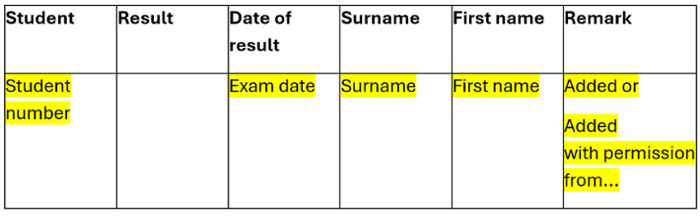
- Voeg de student(en) – met studentnummer en naam – bovenaan de cijferlijst toe, inclusief het behaalde resultaat, en markeer ze in het geel.
- Vermeld "toegevoegd" in het opmerkingenveld.
- Scan de formulieren 'Verklaring voorwaardelijke deelname' ('Onder voorbehoudsformulier') die zijn ingevuld door de studenten die je aan de cijferlijst hebt toegevoegd. Voeg deze scans als bijlage toe aan de e-mail aan de Studentenadministratie Science wanneer je de cijferlijst verstuurt.
Let op: Voor studenten die niet op de cijferlijst staan maar door de docent zijn toegevoegd, wordt gecontroleerd of de aanmelding voor de toets heeft plaatsgevonden volgens de richtlijnen van het aanmeldprotocol van de Universiteit Leiden. Pas na verificatie van de verleende toestemming kan de Studentenadministratie het resultaat in uSis verwerken. Zonder deze toestemming mogen zij het resultaat niet verwerken.
Students die niet hebben deelgenomen
Indien de student zich niet binnen de gestelde termijn afmeldt voor een toets of hertentamen en niet aan de toets deelneemt:
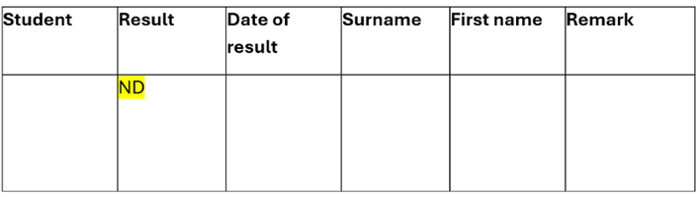
- Vermeld 'ND' op de cijferlijst als resultaat, zoals hieronder weergegeven:
Incomplete resultaten
Indien één of meer onderdelen van een onderwijseenheid niet (voldoende) zijn afgerond:
- Vermeld 'INC.' op de cijferlijst als resultaat, zoals hieronder weergegeven:

Referred to Board of Examiners
If there is a student whose approval depends on the result and has been referred to the Board of Examiners:
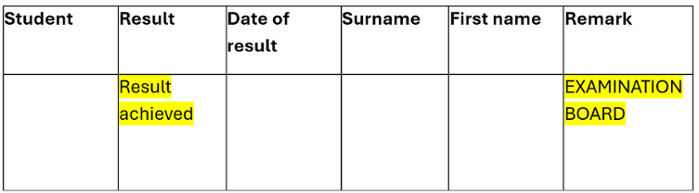
- Please mention on the list of grades in the comment EXAMINATION BOARD
- Do mention the result achieved
As soon as the result has been released by the Examination Board, we can only process this result
Delayed result
If there is a result achieved:
- Please indicate this clearly in the accompanying email
- Use the original transcript of marks of the exam or resit to which the result relates (do not create your own document name)
- Do not change the header document
- Adjust the signing date
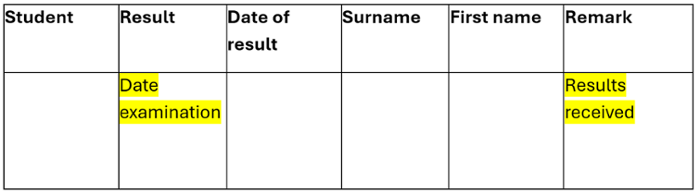
- Remove all students and only mention the student(s) with the result in the transcript and clearly state in the comments: RESULT ACHIEVED.
Revision of previously achieved results
If the result has been revised or a mistake has been made during the assessment of the student or when drawing up the transcript:
- Please indicate this clearly in the accompanying email
- Use the original transcript of marks of the (re)examination to which the change relates (do not create your own document name)
- Do not change the header document
- Adjust the signing date
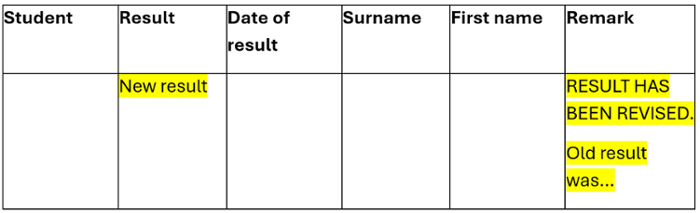
- Remove all students and only mention the student(s) with the changes to the achieved result in the gradebook and clearly state in the comments: RESULT HAS BEEN REVISED
Extra resit outside regular resits
Please note: to take an extra resit, there must be a decision from the Examination Board in advance for this extra resit. Without a decision from the Examination Board, we are not allowed to process the result.
If you are going to take an extra resit for a specific student (group) outside the regular (re)exam, please indicate this clearly in the accompanying email.
- You will not receive an extra transcript for this
- Use the original transcript of the regular resit and only adjust the parts of the header marked in green (leave the study guide number and description of the study part!):
- Remove the numbers in the study activity and clearly state EXTRA RESIT.
- Adjust the signing date
- Remove all students and only mention the student(s) with the result in the transcript and clearly state in the comments: EXTRA RETAKE
If the date of the (re)examination differs from the date stated on the transcript, please indicate this clearly in the accompanying email and on the original transcript so that we can adjust it in uSis.
